
How many keys do you carry every day?
One for your house.
Another for the office drawer.
Maybe another for your cupboard, locker, suitcase or storage area.
Traditional padlocks are simple and familiar, but losing a tiny key can create a surprisingly big problem.
That is one reason the digital padlock has become an interesting alternative.
Instead of depending entirely on a physical key, modern digital padlocks may use a fingerprint, password or smartphone connection to unlock.
Fingerprint models are especially common in today’s market. Current Indian listings include rechargeable biometric padlocks designed for uses such as lockers, luggage, offices, cabinets, bags and some gates or doors.
But does that make a digital padlock better than a traditional lock?
Not always.
The answer depends on where you want to use it, how much security you need and how reliable the particular lock is.
Here’s what you should know before buying one.
What Is a Digital Padlock?
A digital padlock is an electronic version of a conventional portable padlock.
Instead of relying only on a mechanical key, it authenticates the user electronically.
Depending on the model, unlocking methods can include:
- Fingerprint
- PIN or password
- Smartphone app
- Bluetooth
- Multiple digital methods combined
Fingerprint-based models are particularly common in the portable smart-padlock category.
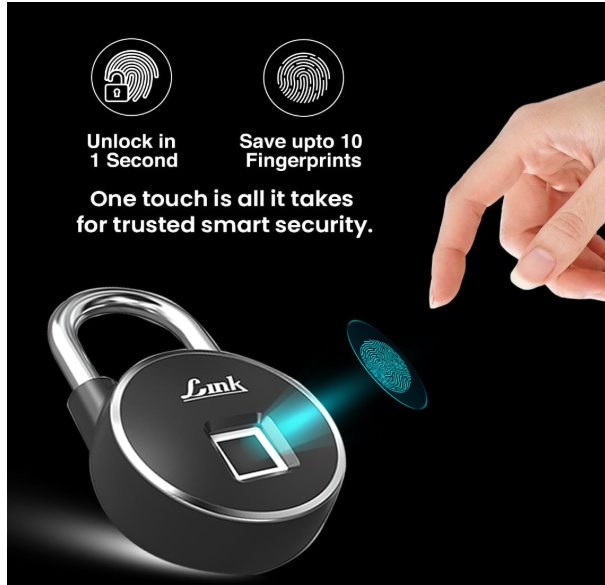
A registered user places a finger on the sensor, the lock verifies the fingerprint and then releases the shackle.
The result is simple:
Your finger effectively becomes your key.
Digital Padlock vs Smart Padlock: Are They the Same?
You’ll see several names while shopping online:
Digital padlock
Smart padlock
Fingerprint padlock
Biometric padlock
Keyless padlock
These terms often overlap, but they don’t always describe exactly the same product.
A fingerprint padlock is digital because it uses electronic authentication.
A smart padlock may go further by adding Bluetooth or app connectivity.
A keyless padlock simply means you don’t need a traditional key for normal access.
This is why you should look beyond the product title.
Check the actual unlocking methods and features before buying.
How Does a Fingerprint Digital Padlock Work?
A fingerprint padlock contains a biometric sensor.
During setup, you register one or more fingerprints.
After that, you place a registered finger on the sensor when you want to unlock it.
If the fingerprint matches the stored data, the locking mechanism releases.
Current Indian fingerprint-padlock listings commonly advertise storage for multiple fingerprints; examples on the market currently mention capacities such as 10 or 20 registered fingerprints, though the number varies by model.
That can be useful when several family members need access to the same locker or storage area.
Why Are Digital Padlocks Becoming Popular?
The biggest reason is convenience.
Traditional padlocks work well, but they come with one obvious dependency:
the key.
Lose it and you may have a problem.
Digital padlocks remove or reduce that dependency.
No Key to Carry
With a fingerprint padlock, you don’t have to remember where you put a small padlock key.
This can be especially convenient for gym lockers, cupboards, luggage and frequently accessed storage.
Quick Access
Instead of finding the correct key, you can place your finger on the sensor.
When the reader works reliably, access can be very quick.
Multiple Users
Many fingerprint padlocks allow multiple fingerprints to be registered.
This means several trusted users can access the same lock without making duplicate keys.
Rechargeable Design
Many portable fingerprint padlocks currently sold in India use rechargeable batteries and USB charging.
That eliminates disposable-key concerns, although it introduces something new to remember:
charging.
Digital Padlock vs Regular Padlock
Here’s the practical comparison.
| Feature | Digital Padlock | Regular Padlock |
|---|---|---|
| Physical key needed | Usually no | Yes |
| Fingerprint access | Available | No |
| Multiple users | Easy on compatible models | Requires duplicate keys |
| Battery required | Yes | No |
| Charging required | Usually | No |
| Electronics | Yes | No |
| Outdoor suitability | Model-dependent | Model-dependent |
| Convenience | High | Simple |
| Failure points | Electronic + mechanical | Primarily mechanical |
| Price | Usually higher | Usually lower |
A digital padlock wins on convenience.
A good traditional padlock wins on simplicity.
Neither is automatically more secure simply because of the technology used.
Where Can You Use a Digital Padlock?
Portable fingerprint locks are marketed for many applications, but not every product is suitable for every use. Current Indian listings commonly mention lockers, offices, luggage, cabinets, gym use, bags, homes and travel. Some also market outdoor or gate use.
Let’s look at the common applications.
Digital Padlock for Locker
A locker is one of the strongest use cases for a compact fingerprint padlock.
This can include:
- Gym locker
- Office locker
- Personal cupboard
- Storage cabinet
- Hostel locker
You don’t have to carry a small key while moving around.
For frequently accessed lockers, fingerprint unlocking can be particularly convenient.
Fingerprint Padlock for Luggage
Digital padlocks are also advertised for travel and luggage.
The advantage is obvious:
there is no tiny suitcase key to lose.
However, check the lock’s physical dimensions before buying.
A thick shackle that works perfectly on a cupboard may not fit through the zipper pulls on your luggage.
For travel, compact size and low weight can matter just as much as technology.
Digital Padlock for Cupboard
A digital padlock for cupboard can be useful where you want regular access without carrying another key.
It can make sense for:
- Personal cupboards
- Office cabinets
- Storage cupboards
- Shared family storage
If several trusted people need access, a model that stores multiple fingerprints can be particularly practical.
Can You Use a Digital Padlock on a Gate?
Potentially — but don’t assume you can.
A gate lock experiences very different conditions from a cupboard lock.
It may face:
- Rain
- Dust
- Heat
- Humidity
- Direct sunlight
- Temperature changes
Some current fingerprint-padlock listings advertise waterproof or weather-resistant construction, but suitability varies significantly by model.
If you’re buying for outdoor use, check the manufacturer’s environmental rating and intended application carefully.
Don’t buy an indoor smart padlock for a gate simply because the product photograph shows outdoor use.
Fingerprint Padlock vs PIN Padlock
There are different ways to make a padlock keyless.
Two obvious options are fingerprint and PIN-based access.
Fingerprint Padlock
Advantages:
- Nothing to remember
- Fast access
- Convenient for frequent use
- Multiple users may be supported
Possible disadvantages:
- Sensor performance can depend on conditions
- Requires battery power
- Fingerprint technology quality varies
PIN Padlock
Advantages:
- No biometric data
- Easy to share a code
- No key required
Possible disadvantages:
- You need to remember the code
- Shared passwords can be passed to others
- Someone may observe the code being entered
Neither approach is universally better.
Choose according to how the lock will actually be used.
What Happens If the Digital Padlock Battery Dies?
This should be one of your first questions before buying.
Not your last.
Electronic locks require power.
Many current fingerprint padlocks use USB-rechargeable batteries.
But the exact behaviour when the battery becomes critically low varies between products.
Some may offer warning indicators.
Others may provide a way to connect external power temporarily.
You should therefore check:
- Low-battery warning
- Charging method
- Charging port
- Emergency power method
- Expected behaviour when battery is flat
Don’t make assumptions.
A digital lock is convenient only when you understand its backup process.
Are Fingerprint Padlocks Waterproof?
Some are marketed as waterproof or weather resistant.
That doesn’t mean all of them are.
Current Indian listings include products explicitly sold as waterproof fingerprint padlocks, showing that weather resistance is a specific feature buyers should check rather than assume.
If the padlock will be exposed to weather, look for a clearly stated IP rating or manufacturer guidance.
Also remember that the charging port and fingerprint sensor are electronic components.
Outdoor suitability deserves more attention than it would for a simple indoor locker.
How Many Fingerprints Should a Digital Padlock Store?
It depends on who will use it.
For one person, you technically don’t need many.
But registering multiple fingers can be useful.
For example, you could register:
- Right thumb
- Left thumb
- Right index finger
- Left index finger
That gives you alternatives if one finger is dirty, injured or difficult for the sensor to read.
For family or office use, additional fingerprint capacity becomes more useful.
Some current products advertise 10-fingerprint storage, while others advertise 20 or more.
Don’t buy purely because one lock supports a huge number of users, though.
If you only need access for two people, 100-user capacity doesn’t automatically make the product better.
Is a Digital Padlock Secure?
This needs a more careful answer than “yes.”
A digital padlock has two sides:
physical security and electronic security.
Physical Security
Look at:
- Shackle thickness
- Shackle material
- Lock-body construction
- Resistance to cutting
- Quality of the internal locking mechanism
The shackle is a particularly important physical component because it is an obvious attack point on conventional padlock designs.
Electronic Security
For fingerprint or app-connected padlocks, the electronics matter as well.
Researchers have demonstrated that poorly secured smart fingerprint locks can potentially introduce privacy and security risks, including attacks involving biometric data.
That doesn’t mean fingerprint padlocks are inherently unsafe.
It means manufacturer quality matters.
Avoid evaluating a security product solely by how futuristic it looks.
Don’t Buy a Fingerprint Lock Only Because It Unlocks Fast
“Unlocks in 0.X seconds” is common marketing language in the biometric-lock market.
Speed is convenient.
But for a padlock, these factors matter more:
Does it authenticate reliably?
Can unauthorised fingerprints open it?
What is the lock body made from?
How strong is the shackle?
What happens when the battery dies?
Can it handle the environment where you’ll use it?
Saving half a second while unlocking doesn’t compensate for poor physical construction.
10 Things to Check Before Buying a Digital Padlock
1. Decide Where You’ll Use It
Start with the application.
Locker?
Cupboard?
Luggage?
Gate?
Office?
Storage box?
Different applications need different levels of physical strength and weather resistance.
2. Check the Unlocking Method
Does it use:
- Fingerprint
- PIN
- App
- Bluetooth
- Multiple methods
Don’t pay for features you won’t use.
3. Check Fingerprint Capacity
If several people need access, confirm how many fingerprints can actually be stored.
4. Check Shackle Dimensions
This is easy to overlook.
The shackle needs to physically fit through whatever you’re locking.
Measure before ordering, especially for luggage or small locker loops.
5. Check Shackle Material
A smart fingerprint sensor does not make a weak shackle strong.
Evaluate the physical lock too.
6. Check Battery Type
Find out whether the battery is:
- Rechargeable
- Replaceable
- Built in
Also check how it is charged.
7. Check Emergency Power Options
Know what you’ll do if the battery becomes flat while the lock is closed.
8. Check Water Resistance
This becomes critical for outdoor applications.
Don’t assume the lock is weather resistant.
9. Check Reset Security
Understand how fingerprints or users are added, deleted and reset.
If resetting the lock is too easy for an unauthorised person, that’s obviously a concern.
10. Check Warranty and Support
Cheap electronics can become expensive if the product fails and there is no support.
A padlock protects something you care about.
After-sales service therefore deserves consideration.
Common Mistakes People Make When Buying Digital Padlocks
Choosing the Cheapest Fingerprint Lock
A fingerprint reader is only one component.
Very cheap construction can compromise the rest of the product.
Ignoring Physical Security
The lock still has a body and shackle.
Don’t evaluate only the electronics.
Using an Indoor Lock Outdoors
A locker padlock and a gate padlock face completely different environments.
Forgetting About Battery Backup
You should understand the emergency process before you ever need it.
Buying a Large Lock for Luggage
Check dimensions.
Compact applications require compact hardware.
Registering Only One Finger
Where the lock permits it, registering multiple fingers can provide a convenient backup.
Assuming “Smart” Means “More Secure”
Smart means the lock includes electronic functionality.
Security still depends on the quality of its mechanical and electronic design.
Digital Padlock vs Combination Padlock
A combination padlock gives you keyless access without biometric electronics.
That makes this comparison useful.
Digital Padlock
Best suited to buyers who value:
- Fast access
- Fingerprint unlocking
- Multiple users
- Modern convenience
Combination Padlock
Best suited to buyers who value:
- No physical key
- No fingerprint storage
- No battery charging
- Mechanical simplicity
If you’re locking inexpensive gym belongings, either option may be adequate depending on the environment.
If you’re protecting higher-value property, evaluate the entire security level rather than simply choosing whichever unlocking mechanism feels more convenient.
Digital Padlock vs Traditional Key Padlock
This comes down largely to convenience versus simplicity.
Choose a Digital Padlock If:
- You frequently lose small keys
- You want fingerprint access
- Several trusted users need access
- You’re comfortable charging the device
- The intended environment suits the lock
Choose a Traditional Padlock If:
- You prefer purely mechanical hardware
- You don’t want to manage batteries
- You need a specialised heavy-duty security padlock
- Electronic features aren’t useful for your application
A digital product isn’t automatically an upgrade in every situation.
It is an upgrade when its advantages solve a real problem for you.
Who Should Consider Buying a Fingerprint Padlock?
A digital padlock can be particularly useful for:
Gym Users
No need to carry a tiny locker key during your workout.
Students
Useful for compatible hostel cupboards, lockers or personal storage.
Office Workers
Can simplify access to personal lockers or cabinets.
Travellers
Compact models may be useful for compatible luggage.
Families
Multiple fingerprints can allow several household members to access shared storage.
Small Businesses
Can be useful for certain cabinets or storage areas where several authorised people require convenient access.
How Much Does a Digital Padlock Cost in India?
The digital padlock price in India varies significantly.
Current marketplace listings span from inexpensive fingerprint padlocks under ₹1,000 to more expensive branded or feature-rich models above ₹2,000, with pricing frequently changing because of discounts and sellers.
That wide range is exactly why price alone isn’t a useful quality indicator.
Compare:
Lock body + shackle + biometric system + battery + weather resistance + warranty + support
before deciding.
Is a ₹500 Fingerprint Padlock Worth Buying?
Potentially for low-risk applications, but don’t buy based only on the excitement of getting biometric technology cheaply.
Ask yourself what you’re protecting.
A lock for a low-value gym locker has a different job from a lock securing expensive equipment.
The value of the item being protected should influence how much attention you give to lock quality.
For security products, the cheapest option can sometimes create false confidence.
How to Maintain a Digital Padlock
Electronic padlocks require slightly different care from purely mechanical locks.
Keep the Sensor Clean
Dirt or residue can interfere with fingerprint recognition.
Clean according to the manufacturer’s instructions.
Keep the Charging Port Protected
If the product includes a protective cover, use it properly.
Recharge Before the Battery Is Empty
Don’t turn every charging cycle into an emergency.
Don’t Force the Shackle
If the lock isn’t opening after authentication, forcing it can cause damage.
Keep Firmware or App Updated
If your smart padlock uses an application and the manufacturer provides updates, keep the associated software reasonably current.
Follow Weather Guidelines
If the manufacturer says the lock is meant for indoor use, don’t leave it permanently exposed outdoors.
Frequently Asked Questions About Digital Padlocks
What is a digital padlock?
A digital padlock is an electronic portable lock that uses methods such as fingerprint, PIN or smartphone authentication instead of relying exclusively on a traditional physical key.
Is a fingerprint padlock safe?
It can be suitable for many applications, but security varies significantly by product. Evaluate both physical construction and the quality of the biometric/electronic system.
What happens if a fingerprint padlock battery dies?
The answer depends on the model. Many rechargeable locks provide low-battery warnings or emergency charging options, but you should check the manufacturer’s instructions before buying.
Can a digital padlock be used outdoors?
Only if the particular model is designed for the environment. Check water resistance, environmental ratings and manufacturer guidance.
Can several people use one fingerprint padlock?
Many models store multiple fingerprints. Current market products commonly advertise support for 10, 20 or more fingerprints depending on the model.
Can I use a digital padlock on luggage?
Yes, if the lock’s shackle dimensions fit the luggage and the product is intended for that application.
Is a digital padlock better than a normal padlock?
It is more convenient for some users, but not automatically better. Traditional padlocks offer mechanical simplicity, while digital padlocks provide keyless access.
Does a digital padlock need Wi-Fi?
Not necessarily. Many fingerprint padlocks authenticate locally and don’t require Wi-Fi. Some smart models may use Bluetooth or an app for additional features.
How do you charge a digital padlock?
Many current portable fingerprint padlocks are USB rechargeable, although charging connectors and battery designs vary by model.
Can fingerprints be deleted from a smart padlock?
Many biometric padlocks provide a procedure for adding or deleting registered fingerprints. The process varies by product, so check its instructions.
Final Thoughts: Should You Buy a Digital Padlock?
A digital padlock solves one very ordinary problem extremely well:
carrying another key.
For a gym locker, cupboard, office cabinet or compatible luggage, fingerprint access can make everyday use noticeably easier.
But don’t allow the fingerprint sensor to distract you from the fact that you’re still buying a lock.
Before purchasing, check:
Shackle strength
Lock-body construction
Fingerprint capacity
Battery backup
Charging method
Water resistance
Physical dimensions
Warranty
Manufacturer support
For low-risk everyday storage, a convenient fingerprint padlock can be a useful upgrade.
For higher-security applications, examine both the physical and electronic security much more carefully.
The best digital padlock isn’t necessarily the model with the biggest fingerprint count or longest feature list.
It’s the one that fits your application, works reliably and provides an appropriate level of protection for what you’re locking.